
Blog
Azure Hybrid Environments: Connectivity to On-Premises Systems
Something that we get asked about all the time when modernizing integration platforms (e.g. BizTalk to Azure), is how do we configure access from Azure to On-Premises systems (SQL Servers, File Shares, SAP, etc.) when using a Hybrid environment. The answer depends on the Azure artifacts being used. Here is a simple breakdown:
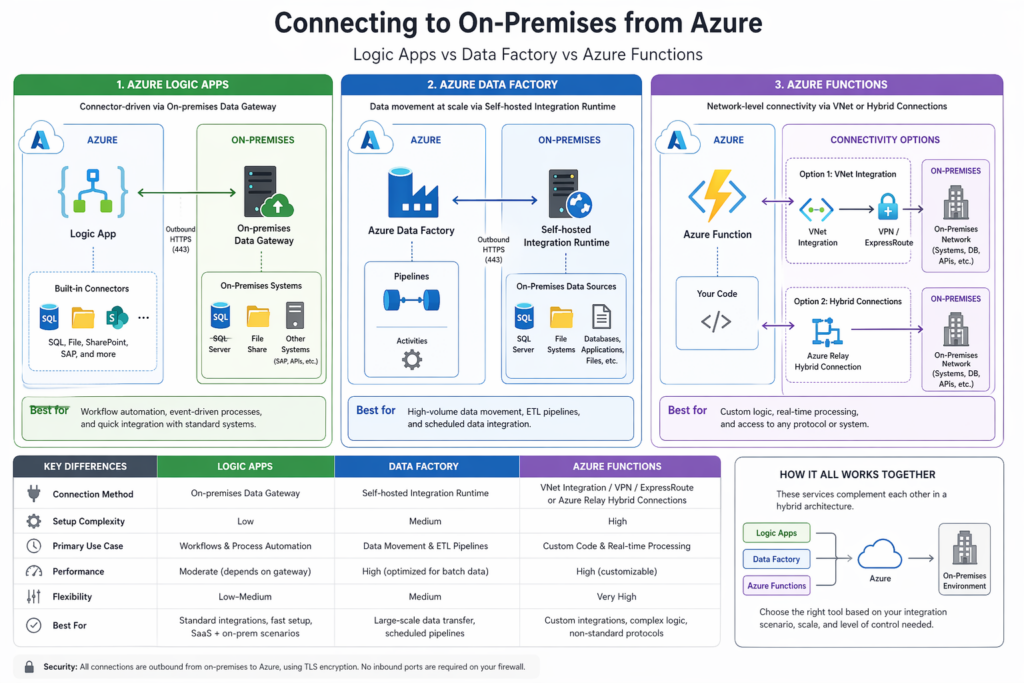
1. Azure Logic Apps: On-Premises Data Gateway
- Azure Logic Apps connects using the On-premises Data Gateway. Install the gateway on a local server (on-premises).
- Configure the Logic App connectors (e.g. SQL Server) to use the gateway.
- The data flows through the gateway securely.
2. Azure Data Factories: Self-hosted Integration Runtime
- Data Factories connects using the Integration Runtime. Install the runtime on a local server (on-premises). While the runtime concept is similar to the Data Gateway, it handles data movement at scale.
- Configure the Data Factory to use the runtime, which acts as a data movement engine.
- The runtime handles extraction, transformation and loading (ETL).
3. Azure Functions: VNet Integration + VPN/ExpressRoute or Hybrid Connections
- There are two options:
- VNet Integration + VPN/ExpressRoute
- Makes use of Azure VPN Gateway and Azure ExpressRoute.
- Azure VPN Gateway is a managed hybrid connectivity service in Microsoft Azure that provides secure, encrypted network tunnels between on-premises environments and Azure virtual networks (VNets).
- Azure ExpressRoute is a private, dedicated network connection service from Microsoft Azure that enables organizations to extend their on-premises networks into Azure data centers.
- Hybrid Connections
- Make use of Azure Relay Hybrid Connections.
- Azure Relay Hybrid Connections is a feature of Azure Relay, a service within Microsoft Azure that enables secure communication between applications across network boundaries. It allows on-premises services to be accessed from the cloud without opening inbound firewall ports or modifying network infrastructure.
- VNet Integration + VPN/ExpressRoute
- The Azure Functions run in Azure with network level connectivity to on-premises systems.
- They work with any protocol.
The following table outlines key differences at a glance:
| Feature | Logic Apps | Data Factory | Azure Functions |
| Primary Method | Data Gateway | Integration Runtime | VNet / Hybrid Connection |
| Setup Complexity | Low | Medium | High |
| Use Case | Workflows | Data pipelines | Custom code |
| Real-time Support | Yes | Limited | Yes |
| Performance | Moderate | High (batch) | High (customizable) |
| Flexibility | Low–Medium | Medium | Very High |
For assistance using Azure Integration Services, reach out to DMS Group, we can help.

Be the first to comment